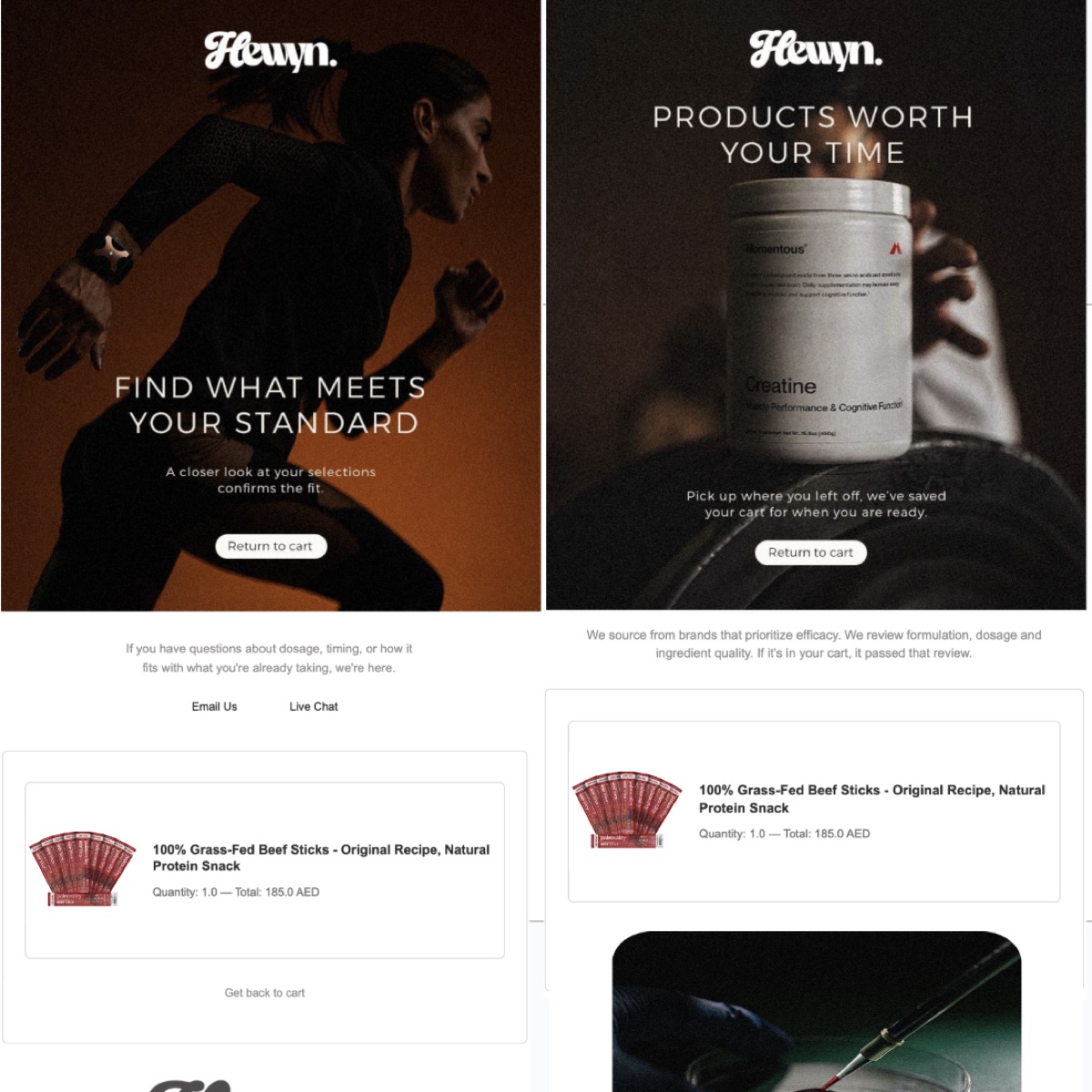
A complete email automation system built from raw HTML because Klaviyo’s visual editor couldn’t handle personalized product cards tied to specific blood test biomarkers.
The Problem
Email was contributing less than 1% of total revenue. The only automated sequence was a basic welcome email. No abandoned cart recovery. No replenishment reminders. No post-purchase flows. And the biggest gap: blood test recommendation emails needed to show personalized product cards tied to specific biomarkers (low iron gets iron-specific products, low vitamin D gets vitamin D products), and that kind of conditional, dynamic content was impossible with Klaviyo’s drag-and-drop editor.
The Approach
I built everything from raw HTML. Not by preference, but by necessity. The biomarker-specific product cards required conditional rendering logic that Klaviyo’s visual builder simply can’t express. Each email template needed to dynamically assemble product recommendation blocks based on which biomarkers flagged in a customer’s blood test results, with the correct product image, name, price, and a brief explanation of why that specific product addresses that specific biomarker.
The full suite includes: abandoned cart series (v1 with a simple reminder flow, v2 with a redesigned multi-step sequence), replenishment reminders timed to product consumption cycles, and the blood test recommendation emails with their personalized product cards. Each email follows a brand template system I built to keep visual consistency across all flows.
One discovery worth noting: Klaviyo’s documented API doesn’t include an endpoint for linking campaigns to templates. The connection exists in the platform, but there’s no public endpoint for it. I found an undocumented endpoint by inspecting network requests in the Klaviyo dashboard and reverse-engineered the campaign-template relationship call. Without it, every campaign would have needed manual template assignment through the UI.
For hero images, I used Shopify’s staged upload flow. You request a presigned URL from Shopify’s GraphQL API, upload the image to their CDN, then reference it in the email. This keeps images loading fast from Shopify’s infrastructure rather than depending on a third-party image host.
Under the Hood
The blood test email templates use conditional rendering that Klaviyo’s visual editor can’t handle. Here’s the structure:
<!-- Biomarker-specific product recommendation card -->
<table class="product-card" role="presentation">
  <tr>
    <td class="product-image">
      <img src="{{ product.image_url }}" alt="{{ product.title }}" />
    </td>
    <td class="product-details">
      <h3>{{ product.title }}</h3>
      <p class="biomarker-reason">
        Recommended for your {{ biomarker.name }} levels
      </p>
      <p class="price">AED {{ product.price }}</p>
      <a href="{{ product.url }}" class="cta-button">View Product</a>
    </td>
  </tr>
</table>
For hero images, I used Shopify’s staged upload flow:
# Step 1: Request presigned URL from Shopify
mutation = """
  mutation stagedUploadsCreate($input: [StagedUploadInput!]!) {
    stagedUploadsCreate(input: $input) {
      stagedTargets {
        url
        resourceUrl
        parameters { name value }
      }
    }
  }
"""

# Step 2: Upload to Shopify CDN
# Step 3: Reference CDN URL in email template
# Result: fast-loading images from infrastructure we control
Key Decisions
-
Raw HTML over Klaviyo’s visual editor. The visual editor is fine for newsletters and simple announcements. But when you need a product card that only renders if a customer’s blood test shows a specific deficiency, with the correct product pulled dynamically, you need to write the template logic yourself. This also meant dealing with email rendering engines directly, which turned out to be its own education.
-
Undocumented API endpoint for campaign-template linking. The alternative was manual assignment through Klaviyo’s UI for every campaign. For a one-off, that’s fine. For a system designed to run multiple automated flows, it needed to be programmatic. The undocumented endpoint was stable enough to build on, and it saved hours of repetitive UI clicking.
-
Shopify staged uploads for images. Email images need to load reliably and fast. Shopify’s CDN handles both. The staged upload flow is more steps than just hosting images somewhere, but it keeps everything within infrastructure we already pay for and control.
Scale
- Full brand template system across all email types
- Abandoned cart series (v1 + v2 with multi-step sequences)
- Replenishment reminder flows timed to product consumption cycles
- Personalized blood test recommendation emails with dynamic biomarker-specific product cards
- Hero images served via Shopify CDN through staged uploads
What I Learned
I’ve briefed email campaigns hundreds of times but never built one from raw HTML. Discovering that Outlook renders emails using Microsoft Word’s engine was a reality check about how disconnected marketing leadership can be from execution details. I’ve sat in meetings debating email design without understanding that half our audience was viewing it through a rendering engine from 2007. That gap between “approving creative” and “understanding delivery” is wider than most marketing leaders realize or want to admit.
The biomarker personalization was technically interesting, but the bigger takeaway is simpler: email contributing less than 1% of revenue wasn’t a technology problem. It was a prioritization problem. The sequences I built aren’t revolutionary. Abandoned cart emails and replenishment reminders are table stakes for any DTC brand. We just hadn’t built them. No one had prioritized it. The tools existed, the data existed, the opportunity existed. It sat there because it never made it to the top of a roadmap.
Sometimes the most valuable thing you can build is the thing everyone assumed was already running.
Built for Hewyn, a DTC wellness brand. Architecture and email flows shown. Open rates, click rates, and revenue attribution anonymized.